


Schwab Mobile
3.112.88K Reviews
App Specs
- Version
- Varies with Device
- Updated On
- License
- Free
- Downloads
- 5,000,000+
- Developer
- The Charles Schwab Corporation
- Categories
- Finance
- Platform
- Android
Screenshots
 Analysis by AppCompare
I use a finance app differently when I’m checking a balance than when I’m deciding whether to place a trade, and that distinction matters with Schwab Mobile. It is designed to bring investing and banking tasks into one place, which can be handy if your accounts are already with Charles Schwab. I find it most useful as a companion for quick checks and routine account management, rather than as a reason to make more frequent trades.
Where it fits in a daily routine
A realistic use is checking an account before a planned purchase, then looking at investments later without switching between separate brokerage and banking apps. For example, I might confirm that a deposit has arrived, review the account balance, and then check how my holdings are doing during a break. Keeping those tasks together saves small amounts of time and gives me a clearer picture of my cash and investments in the same session.
That convenience does not replace a budget or a considered financial plan. A market move can be distracting when it appears beside everyday banking information, so I’d decide in advance which notifications are useful and when I actually want to check the portfolio. For long-term investors, a quick balance check may be enough; the app’s trading tools are there when needed, but they do not make every market fluctuation worth acting on.
Who is likely to get the most from it
I’d point existing Schwab customers toward the app if they want to monitor investments and handle banking on a phone. It can also suit a newer investor who wants research and educational material close to the account tools, provided they are comfortable learning at their own pace and understand that app information is not a personal financial plan. The central benefit is having several related tasks in one place, not removing the need to make careful decisions.
It is less compelling if you mainly want a simple spending tracker, a tool that combines accounts from many financial institutions, or a brokerage app chosen primarily for a particular trading style. In those cases, a dedicated budgeting service or another investment platform may match the job better. I would also think twice about doing detailed research on a small phone screen: the app can make information accessible, but a larger display is often more comfortable when comparing charts or reading at length.
Small habits that make the app more useful
One practical approach is to customize the dashboard around the accounts you check most, then keep less urgent information out of the way. That reduces the temptation to treat every screen as equally important. I’d also use research as a preparation step: identify what I want to learn before opening charts, and write down the question I’m trying to answer. This makes it easier to distinguish useful context from a stream of numbers that might encourage an impulsive trade.
Notifications are most valuable when they flag activity I genuinely need to notice, such as an account event, rather than simply pulling me back into the app. I’d review the available notification choices and keep only the ones that help me take a specific action. For security, I’d make use of the sign-in protections described in the app and keep my device itself secured; a convenient login is helpful, but it is still worth treating a phone with financial access carefully.
Worth Reading Before You Choose

EA SPORTS FC Mobile 26 Is a Bigger Football Game, but It Takes Time

Flipboard Shows What News Apps Must Do Beyond the Feed

Switching to Android Auto Means Rethinking Your Driving Routine

Google Calendar Makes a Crowded Week Easier to Manage

Ludo King Makes the Most of the Minutes Between Plans

Baby Panda World Brings Quick Play to Modern Phones, but Its Game Library Feels Busy
How it compares with other finance apps
Compared with a standalone brokerage app, Schwab Mobile’s appeal is the combination of investing and banking in one Schwab-focused experience. Compared with a bank app, it brings portfolio monitoring, trading, and investment research into the same general routine. That blend is useful when you already use Schwab for more than one purpose, but it is not automatically better than keeping separate tools if you prefer a dedicated budgeting app or a different brokerage.
The trade-off is focus. An all-in-one app can reduce app switching, yet it also places banking, market information, and trading within easy reach of one another. I’d treat that as a convenience to manage rather than an invitation to check constantly. If the main thing you need is an overview of household spending across multiple providers, or if you want a specialized analysis workspace, the usual alternatives may be better suited to that narrower task.
Your Financial Hub on the Go
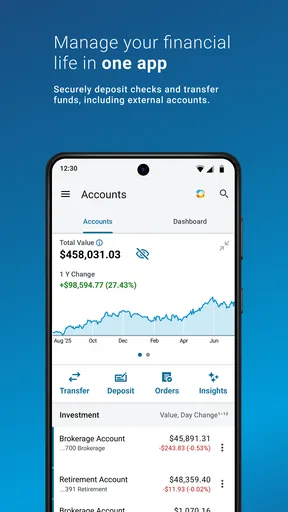
First off, the Schwab Mobile app is like having a financial advisor right in your pocket. I mean, who doesn’t love the convenience of checking their investments while waiting in line for coffee? The app offers a comprehensive view of your accounts, and it’s all accessible with a few taps.
Features That Stand Out
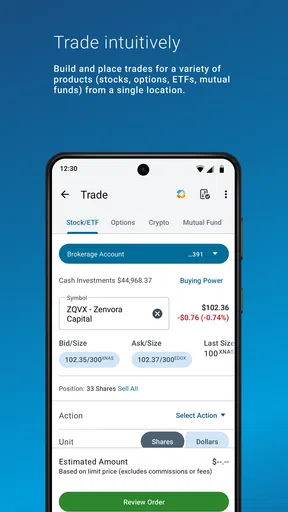
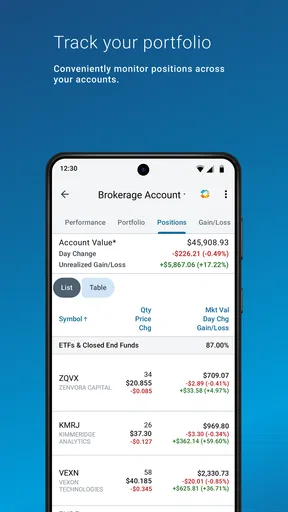
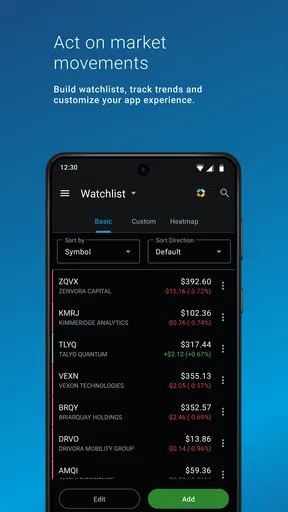
Alright, let’s get into the nitty-gritty. The app lets you monitor your portfolio, trade stocks, and even manage your checking and savings accounts. What caught my eye was the customizable dashboard. You can tailor your view to focus on what matters most to you, whether it’s your retirement fund or your latest stock picks.
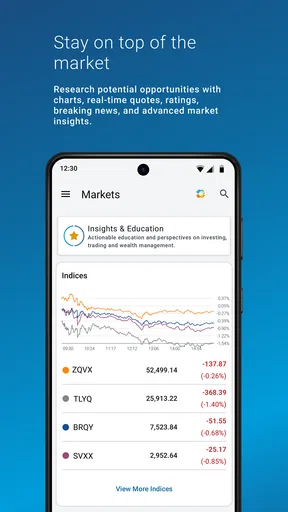
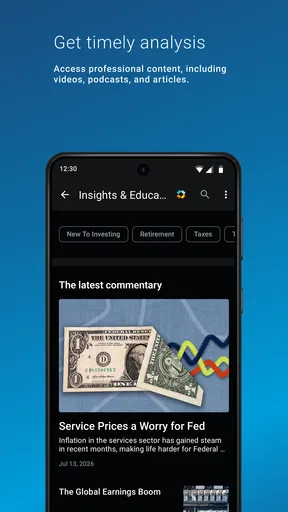
Another cool feature is the research tools. I felt like a Wall Street pro with all the data and charts available at my fingertips. And if you’re like me, who occasionally needs a bit of guidance, the app’s educational resources are pretty handy. From articles to videos, there’s plenty to help you make informed decisions.
Security and Peace of Mind
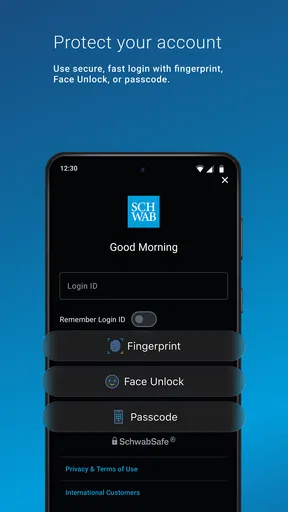
Now, we can’t talk finance apps without addressing security, right? Schwab Mobile takes this seriously. With features like fingerprint login and two-factor authentication, I felt my data was in safe hands. It’s like having a digital fortress protecting your financial information.
User Experience
As someone who appreciates a sleek design, the app didn’t disappoint. Navigating through the app is a breeze. The interface is clean and intuitive, which makes managing finances less daunting. Plus, the app performs smoothly, with quick loading times that keep frustration at bay.
I also appreciated the notifications feature. It keeps you updated on market trends and account activity, so you’re always in the loop. Whether it’s a sudden dip in the market or an account deposit, you’ll know right away.
What its history tells us—and what it doesn’t
Schwab Mobile is a finance app from The Charles Schwab Corporation, released on May 25, 2011. Its long presence in app stores gives it an established place in the company’s customer experience, but age alone does not tell me how any particular screen or workflow has changed. I would separate that confirmed release history from assumptions about recent redesigns or feature additions: without a specific change to point to, it is more useful to judge the app by the functions available now and how well they fit your routine.
For current users, the meaningful test is whether the account view, research, and trading tools continue to support the tasks they actually perform. Someone who mostly checks balances may care more about quick access and clear account activity than about advanced research. An active investor may value the research and trade access, while still preferring a larger screen for careful comparison. I would not treat the app’s age as proof that it is either dated or continuously improved; the practical question is whether its present workflow works for you.
Ratings, cost, and expectations
The app is free to download and is rated for Everyone. It has more than a million installs, an average rating of 3.0 from around 29,000 ratings, and about 13,000 written reviews. I read that mix as a reason to set realistic expectations: the app serves a broad range of banking and investing needs, and a middle-of-the-road average suggests that a smooth experience should not simply be assumed for every person or device. Ratings can reflect different expectations, too—someone wanting quick account access may judge it differently from someone expecting a specialized trading workstation.
Free to download does not mean every investing choice is free of cost or risk; the app is a way to access financial accounts, not a promise about the outcome of trades. Before placing an order, I’d check the details shown for that transaction and make sure I understand what I’m submitting. If you only need a place to learn basic money concepts, the educational material may help, but you do not need to trade just because the tools are available.
Questions worth settling before relying on it
If you are wondering whether it can handle both investing and everyday banking, the answer is yes: the app supports portfolio monitoring and stock trading alongside checking and savings account management. If your main concern is whether you can tailor the first screen, the customizable dashboard gives you a way to prioritize what you want to see. Those strengths are most useful when you already have Schwab accounts; they do not turn the app into a universal dashboard for unrelated financial providers.
If you are deciding between phone and computer, I’d use the phone for routine checks, account activity, and straightforward tasks, then move to a larger screen when I want to read extensively or compare information carefully. If you are asking whether the app is suitable for a beginner, I think it can be a useful place to explore research and educational resources, but beginners still need to make their own judgments and should avoid confusing easy access with personalized advice. And if your concern is protection, the app includes fingerprint login and two-factor authentication; I would pair those options with sensible device security rather than treating any login method as a guarantee.
Accessibility and Support
One of the standout aspects of Schwab Mobile is its accessibility. It’s available on both Android and iOS, so no matter your device preference, you’re covered. And if you ever run into issues or have questions, the customer support is just a tap away. The support team is responsive and knowledgeable, which is a huge plus.
Is It Worth It?
In my opinion, if you’re looking for a reliable, user-friendly app to manage your finances, Schwab Mobile is a solid choice. It blends functionality with ease of use, making it suitable for both beginners and seasoned investors. Plus, the peace of mind that comes with its robust security features is worth mentioning again.
So, whether you’re checking your stocks on the go or diving into market research, this app has got you covered. Give it a try, and you might just find it becomes an essential part of your financial routine. Happy investing!
Pros
- User-friendly interface for easy navigation.
- Comprehensive financial tools and resources.
- Real-time market data and updates.
- Secure login with fingerprint and face ID.
- Customizable alerts for portfolio tracking.
Cons
- Limited advanced charting features.
- Occasional app crashes reported.
- No cryptocurrency trading options.
- High fees for some transactions.
- Delayed customer service responses.
FAQs for Schwab Mobile
What features does Schwab Mobile offer?
Schwab Mobile provides a comprehensive suite of features including real-time trade execution, detailed portfolio analysis, stock research tools, and customizable watchlists. Users can access account balances, view transaction history, and deposit checks using mobile check deposit. Additionally, the app offers secure login options such as fingerprint or facial recognition.
Is Schwab Mobile secure for trading?
Yes, Schwab Mobile is designed with robust security measures to protect users' financial information. The app uses encryption and offers secure login options like biometric authentication. Additionally, it provides alerts and notifications to help monitor account activity and ensure that any unauthorized access is quickly identified.
Can I manage multiple accounts with Schwab Mobile?
Absolutely, Schwab Mobile allows users to manage multiple accounts seamlessly. Whether you have individual, joint, or retirement accounts, you can access and manage them all from within the app. The interface is designed to provide an organized view, making it easy to switch between accounts and track performance.
Does Schwab Mobile offer customer support?
Yes, Schwab Mobile users have access to comprehensive customer support. You can reach out via phone, chat, or email directly through the app. There are also extensive online resources, including FAQs and tutorials, to help troubleshoot common issues and provide guidance on using the app’s features effectively.
Are there any fees associated with using Schwab Mobile?
Schwab Mobile itself is free to download and use. However, standard brokerage fees may apply for certain transactions, like stock trades or mutual fund purchases. It's advisable to review Charles Schwab's fee schedule for specific details on trading costs or any other potential charges related to account services.


